
[toc]
视图结构基础
Most of the things you might want to do visually are done with view objects—instances of the UIView class. A view object defines a rectangular region on the screen and handles the drawing and touch events in that region. A view can also act as a parent for other views and coordinate the placement and sizing of those views. The UIView class does most of the work in managing these relationships between views, but you can also customize the default behavior as needed.
大多数表面上你想做的事已经被 UIView 类的实例对象做完了.
一个视图对象定义了屏幕上的一个矩形区域, 在这个区域里处理绘画和触摸事件.
一个视图也能做为其它视图的父视图, 并协调这些视图的位置和大小.
UIView 类在管理视图间的关系上做了大量工作, 不过你还是可以自定义你需要的默认行为.
Views work in conjunction with Core Animation layers to handle the rendering and animating of a view’s content. Every view in UIKit is backed by a layer object (usually an instance of the CALayer class), which manages the backing store for the view and handles view-related animations. Most operations you perform should be through the UIView interface. However, in situations where you need more control over the rendering or animation behavior of your view, you can perform operations through its layer instead.
视图与核心动画层一起工作来处理一个视图内容的渲染和动画.
UIKit 中的每个视图都被一个层对象(通常是 CALayer 实例对象)支持, 它为视图管理后台存储和处理视图相关动画.
你执行的大多数操作应该通过 UIView 接口.
然而, 在你需要更多控制在你的视图的渲染或动画行为上, 你能通过它的层(layer) 执行操作.
To understand the relationship between views and layers, it helps to look at an example. Figure 1-1 shows the view architecture from the View Transitions sample application along with the relationship to the underlying Core Animation layers. The views in the application include a window (which is also a view), a generic UIView object that acts as a container view, an image view, a toolbar for displaying controls, and a bar button item (which is not a view itself but which manages a view internally). (The actual ViewTransitions sample application includes an additional image view that is used to implement transitions. For simplicity, and because that view is usually hidden, it is not included in Figure 1-1.) Every view has a corresponding layer object that can be accessed from that view’s layer property. (Because a bar button item is not a view, you cannot access its layer directly.) Behind those layer objects are Core Animation rendering objects and ultimately the hardware buffers used to manage the actual bits on the screen.
为了理解视图(views)和层(layers)的关系, 举个例子.
图片 1-1 显示了来自ViewTransitions的示例应用的视图结构与底层核心动画层的关系.
这个应用中的视图包含了一个窗口(也是一个视图), 一个一般的 UIView 对象做为容器视图, 一个图片视图, 一个显示控件的工具条, 和一个条形按钮项目(它并不是一个视图,而是在内部管理一个视图).
(真正的ViewTransitions示例应用包含另一个图片视图用来实现转场. 为了简单, 而且它通常都是隐藏的, 所以没有在 Figure1-1中显示.)
每个视图有一个对应的层对象, 通过视图的 layer 属性获得.(因为条形按钮项目不是一个视图, 你不能直接获得它的 layer 属性.)
层对象背后是核心动画渲染对象并最终用于管理屏幕上的实际位(actual bits?)的硬件缓冲区.
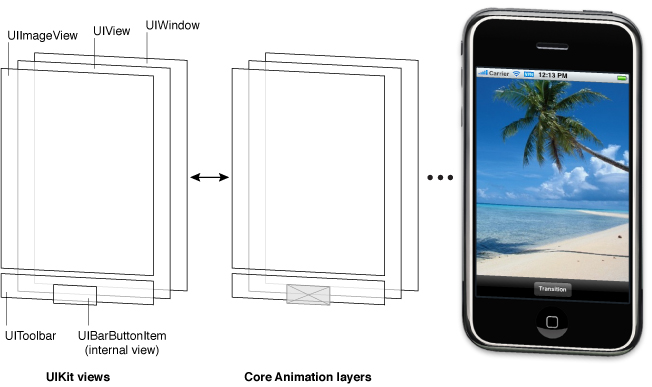
Figure 1-1 Architecture of the views in a sample application
The use of Core Animation layer objects has important implications for performance. The actual drawing code of a view object is called as little as possible, and when the code is called, the results are cached by Core Animation and reused as much as possible later. Reusing already-rendered content eliminates the expensive drawing cycle usually needed to update views. Reuse of this content is especially important during animations, where the existing content can be manipulated. Such reuse is much less expensive than creating new content.
核心动画层对象的使用,对性能有重要的影响.
一个视图对象实际的绘画代码尽可能少的调用, 当代码被调用, 结果被核心动画缓存, 之后会被尽可能多的复用.
复用已被渲染的内容忽略了通常需要更新视图的昂贵的绘图周期, .
复用这些内容在动画时尤其重要, 在现有的内容可以被操控的过程中.
这些复用比起创建新内容花销小得多.
内容模式
Each view has a content mode that controls how the view recycles its content in response to changes in the view’s geometry and whether it recycles its content at all.
When a view is first displayed, it renders its content as usual and the results are captured in an underlying bitmap.
After that, changes to the view’s geometry do not always cause the bitmap to be recreated.
Instead, the value in the contentMode property determines whether the bitmap should be scaled to fit the new bounds or simply pinned to one corner or edge of the view.
每个视图都有一个内容模式来控制视图如何缩放它的内容, 以响应它视图中的几何结构变化, 以及是否缩放全部.
当视图第一次显示之后, 它渲染它的内容, 把结果显示到底层位图(bitmap)上.
在那之后, 改变视图的几何形状并不一定会重新创建位图, 而是, contentMode 属性的值决定视图是否应该被缩放来适应新边界, 或被钉到一个角落或四边.
The content mode of a view is applied whenever you do the following:
视图的内容模式应用如下:
Change the width or height of the view’s frame or bounds rectangles.
改变视图 frame 的 width 或 height, 或者矩形边界(bounds).Assign a transform that includes a scaling factor to the view’s transform property.
给视图赋一个 transform 属性, 它包含一个缩放因数.
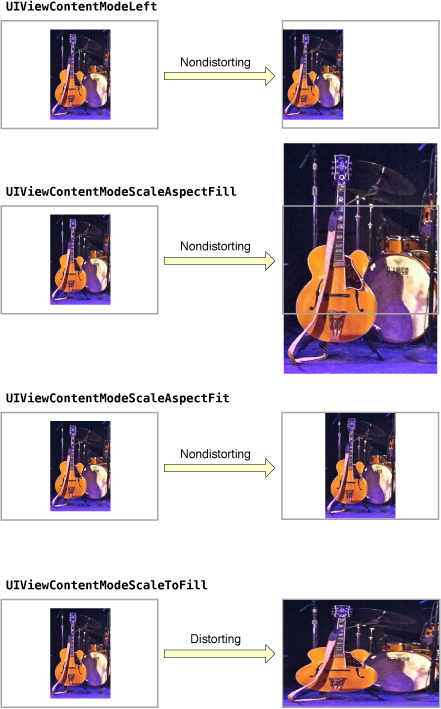
By default, the contentMode property for most views is set to UIViewContentModeScaleToFill, which causes the view’s contents to be scaled to fit the new frame size.
Figure 1-2 shows the results that occur for some content modes that are available.
As you can see from the figure, not all content modes result in the view’s bounds being filled entirely, and those that do might distort the view’s content.
大多数视图默认的 contentMode 属性被设置为UIViewContentModeScaleToFill, 这会让视图内容适应新的 frame 尺寸.
Figure 1-2 显示了一些可用的内容模式.
正如你所见, 并不是所有的内容模式结果都会填充满整个视图, 而让视图失真.
Figure 1-2 Content mode comparisons
Content modes are good for recycling the contents of your view, but you can also set the content mode to the UIViewContentModeRedraw value when you specifically want your custom views to redraw themselves during scaling and resizing operations.
Setting your view’s content mode to this value forces the system to call your view’s drawRect: method in response to geometry changes.
In general, you should avoid using this value whenever possible, and you should certainly not use it with the standard system views.
内容模式在循环利用视图内容方面做的很好, 但你依然可以设置为UIViewContentModeRedraw, 当你想指定自定义视图在缩放和调整大小时去重绘它自己.
给你的视图设置内容模式强制系统调用drawRect:方法响应几何改变.
通常只要可能, 你应该避免使用这个值, 更不能用在标准系统视图上.
可拉伸的视图
You can designate a portion of a view as stretchable so that when the size of the view changes only the content in the stretchable portion is affected.
You typically use stretchable areas for buttons or other views where part of the view defines a repeatable pattern.
The stretchable area you specify can allow for stretching along one or both axes of the view.
Of course, when stretching a view along two axes, the edges of the view must also define a repeatable pattern to avoid any distortion.
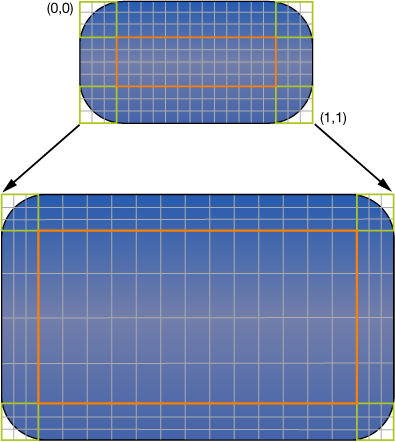
Figure 1-3 shows how this distortion manifests itself in a view.
The color from each of the view’s original pixels is replicated to fill the corresponding area in the larger view.
你可以指定视图的一部分为可拉伸的, 这样当视图尺寸改变时只有可拉伸的那部分会受到影响.
你通常用可拉伸的区域, 为按钮或视图的一部分, 定义一个可重复的参照(pattern).
你指定的可拉伸区域能按一条或两条坐标拉伸.
当然, 当沿着两条坐标拉伸视图时, 视图的边沿也必须定义一个可重复的参照(pattern)来避免视图失真.
图 1-3 展示了这种失真是如何在视图中表现出来的.
视图的每个原始像素的颜色都被复制到大视图的相应位置.
Figure 1-3 Stretching the background of a button
You specify the stretchable area of a view using the contentStretch property.
This property accepts a rectangle whose values are normalized to the range 0.0 to 1.0.
When stretching the view, the system multiplies these normalized values by the view’s current bounds and scale factor to determine which pixel or pixels need to be stretched.
The use of normalized values alleviates the need for you to update the contentStretch property every time the bounds of your view change.
你用contentStretch属性指定一个视图的可拉伸区域.
这个属性接收一个矩形, 其值被规定为 0.0 - 1.0 之间.
当拉伸视图时, 系统会用视图当前的边界(bounds)和缩放因子(scale factor)乘上这个值, 来决定哪些像素需要被拉伸.
这个规范化的值减少了你每次视图 bounds 改变更新contentStretch属性的需要.
The view’s content mode also plays a role in determining how the view’s stretchable area is used.
Stretchable areas are only used when the content mode would cause the view’s content to be scaled.
This means that stretchable views are supported only with the UIViewContentModeScaleToFill, UIViewContentModeScaleAspectFit, and UIViewContentModeScaleAspectFill content modes.
If you specify a content mode that pins the content to an edge or corner (and thus does not actually scale the content), the view ignores the stretchable area.
视图的内容模式在决定视图如何利用科拉伸区域起重要作用.
可拉伸区域只有当内容模式导致了视图内容缩放时有用.
Note: The use of the contentStretch property is recommended over the creation of a stretchable UIImage object when specifying the background for a view. Stretchable views are handled entirely in the Core Animation layer, which typically offers better performance.